Skip to content →

Category: Tech Blog

Here you can find my random notes on software design and development, software engineering, coding, and all other tech-related stuff.

NumPy’s ndarray indexing

In NumPy a new kind of array is provided: n-dimensional array or ndarray. It’s usually fixed-sized and accepts items of the same type and size. For example, to define a 2×3 matrix:

import numpy as np
a = np.array([[1,2,3,], [4,5,6]], np.int32)

When indexing ndarray, it supports “array indexing” other than single element indexing.  (See http://docs.scipy.org/doc/numpy/user/basics.indexing.html)

It is possible to index arrays with other arrays for the purposes of selecting lists of values out of arrays into new arrays. There are two different ways of accomplishing this. One uses one or more arrays of index values. The other involves giving a boolean array of the proper shape to indicate the values to be selected. Index arrays are a very powerful tool that allow one to avoid looping over individual elements in arrays and thus greatly improve performance.

So you basically can do the following:

a = np.array([1, 2, 3], np.int32)
a[np.array([0, 2])) # Fetch the first the third elements, returns np.array([1, 3])
a[np.array([True, False, True])] # Same as the line above

Besides, when you do equals operation on ndarrays, another ndarray is returned by comparing each element:

a = np.array([1, 2, 3], np.int32)
a == 2 # Returns array([False,  True, False], dtype=bool)
a != 2 # Returns array([ True, False,  True], dtype=bool)
a[a != 2] # Returns a sub array that excludes elements with a value 2, in this case array([1, 3], dtype=int32)
Leave a Comment

Statistics of insurance sold on Taobao.com on Valentine’s Day

On Feb. 14th Taobao launched a campaign to sell insurance products, which promises 7% yearly interest rate. The sales data is public, so I wrote a script to crawl them down and did a brief study on this data. Here’re the results.

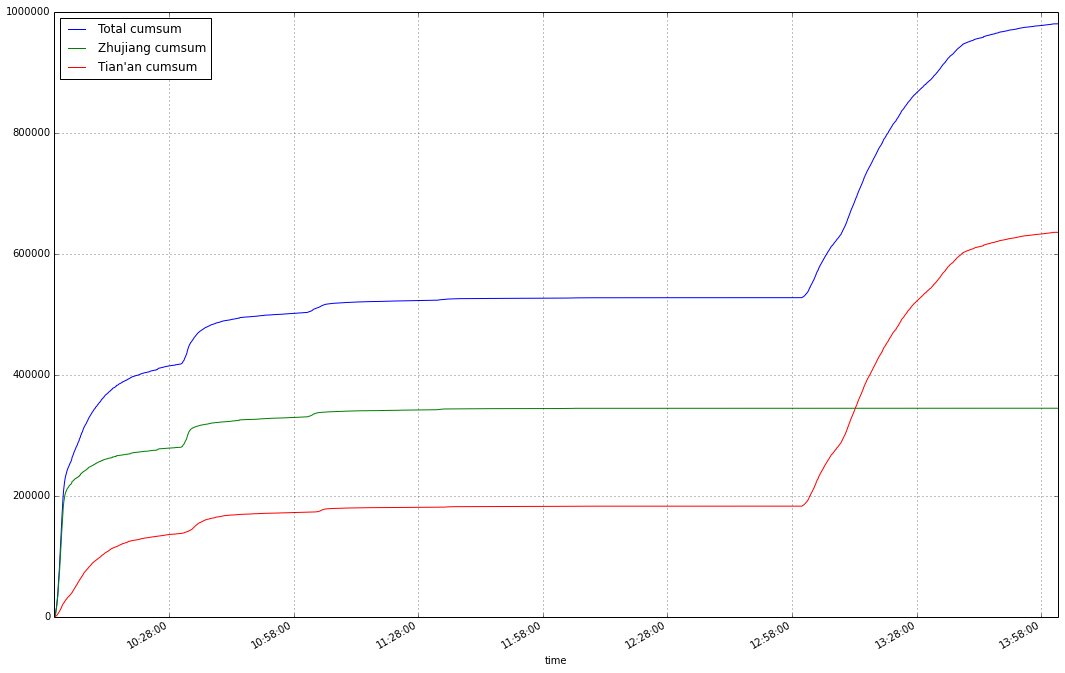
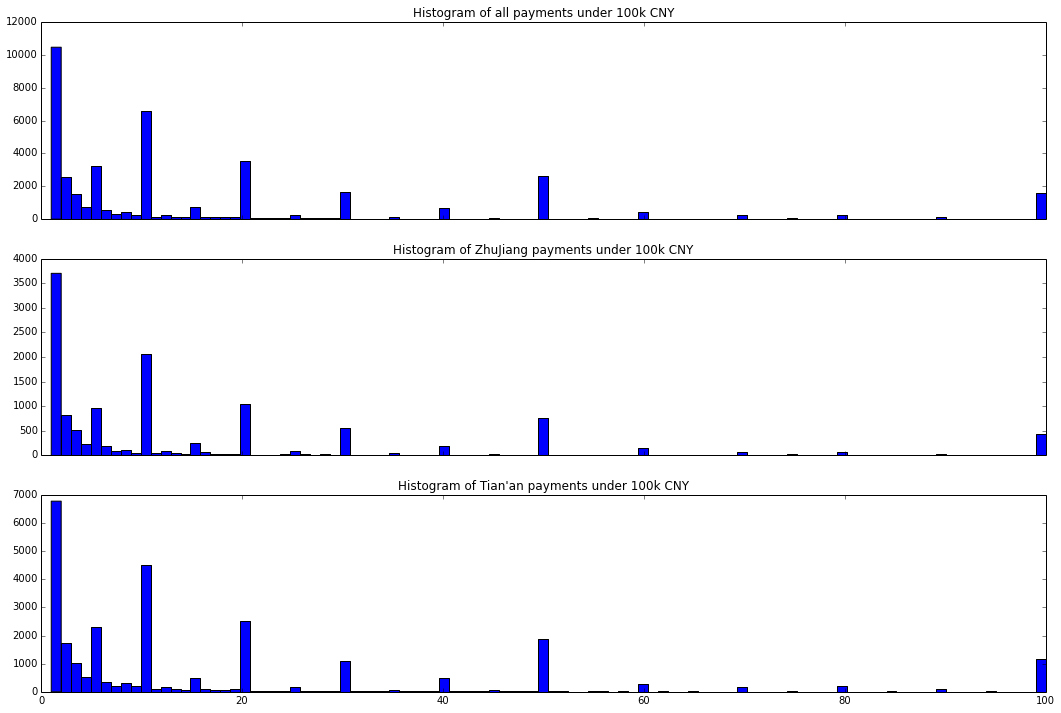
On that day (actually sold out in less than two hours in total) more than 40,000 people participated, resulting a total sales of almost one billion CNY (the exact number: 980,270,000 CNY). Two companies participated in this sales campaign: Zhujiang and Tian’an. The sales statistics are:

ZhujiangTian’anTotal
# of Customers138312909242923
Sales mean (k CNY)24.92205921.84700322.837872
Sales min (k CNY)111
Sales 25% (k CNY)122
Sales 50% (k CNY)101010
Sales 75% (k CNY)202522
Sales max (k CNY)10009001000
Sales total (k CNY)344697635573980270

The histograms of how many people pay for each amount.

le100kgt100kle100k

Zhujiang was extremely popular: in 2 minutes and 56 seconds it reached a sales of 200,212,000 CNY, that’s more than 1 million CNY sales PER SECOND! Indeed Chinese are crazy about online shopping. 😀

Leave a Comment

MapReduce in MongoDB

http://docs.mongodb.org/manual/core/map-reduce/

http://docs.mongodb.org/manual/reference/command/mapReduce/

> db.lattern_money_record.mapReduce( function() { emit(this.quantity, 1) }, function(key, values) { return Array.sum(values) }, {   query: {'quantity': {$gt: 500}}, out: {inline: 1} } )
{
	"results" : [
		{
			"_id" : 550,
			"value" : 3
		},
		{
			"_id" : 570,
			"value" : 1
		},
		{
			"_id" : 580,
			"value" : 1
		},
		{
			"_id" : 583,
			"value" : 1
		},
		{
			"_id" : 587,
			"value" : 1
		},
		{
			"_id" : 600,
			"value" : 2
		},
		{
			"_id" : 660,
			"value" : 1
		},
		{
			"_id" : 700,
			"value" : 2
		},
		{
			"_id" : 800,
			"value" : 5
		},
		{
			"_id" : 900,
			"value" : 2
		},
		{
			"_id" : 924,
			"value" : 1
		},
		{
			"_id" : 949,
			"value" : 1
		},
		{
			"_id" : 980,
			"value" : 1
		},
		{
			"_id" : 990,
			"value" : 1
		},
		{
			"_id" : 1000,
			"value" : 12
		}
	],
	"timeMillis" : 36,
	"counts" : {
		"input" : 35,
		"emit" : 35,
		"reduce" : 6,
		"output" : 15
	},
	"ok" : 1,
}

The MapReduce code I used to analyze the 20 million hotel reservation records:

def get_aggregation(collection):
    '''
    1. Get unique set of people
    2. Get most frequent users
    3. Get aggregation by location of birth, age, month and day of birth
    '''
    # Emit multiple times in mapper function:
    # http://docs.mongodb.org/manual/reference/command/mapReduce/
    mapper = Code('''
                  function() {
                    function validate_rid(id) {
                        // From: https://gist.github.com/foxwoods/1817822
                        // 18位身份证号
                        // 国家标准《GB 11643-1999》
                        function rid18(id) {
                            if(! /\d{17}[\dxX]/.test(id)) {
                                return false;
                            }
                            var modcmpl = function(m, i, n) { return (i + n - m % i) % i; },
                                f = function(v, i) { return v * (Math.pow(2, i-1) % 11); },
                                s = 0;
                            for(var i=0; i<17; i++) {
                                s += f(+id.charAt(i), 18-i);
                            }
                            var c0 = id.charAt(17),
                                c1 = modcmpl(s, 11, 1);
                            return c0-c1===0 || (c0.toLowerCase()==='x' && c1===10);
                        }

                        // 15位身份证号
                        // 2013年1月1日起将停止使用
                        // http://www.gov.cn/flfg/2011-10/29/content_1981408.htm
                        function rid15(id) {
                            var pattern = /[1-9]\d{5}(\d{2})(\d{2})(\d{2})\d{3}/,
                                matches, y, m, d, date;
                            matches = id.match(pattern);
                            y = +('19' + matches[1]);
                            m = +matches[2];
                            d = +matches[3];
                            date = new Date(y, m-1, d);
                            return (date.getFullYear()===y && date.getMonth()===m-1 && date.getDate()===d);
                        }

                        // return rid18(id) || rid15(id);
                        try {
                            ret = rid18(id) || rid15(id);
                            return ret;
                        } catch (err) {
                            return false;
                        }
                    }

                    function validateEmail(email) {
                        // http://stackoverflow.com/questions/46155/validate-email-address-in-javascript
                        var re = /^(([^<>()[\]\\.,;:\s@\"]+(\.[^<>()[\]\\.,;:\s@\"]+)*)|(\".+\"))@((\[[0-9]{1,3}\.[0-9]{1,3}\.[0-9]{1,3}\.[0-9]{1,3}\])|(([a-zA-Z\-0-9]+\.)+[a-zA-Z]{2,}))$/;
                        return re.test(email);
                    }

                    var str = this.CtfId;
                    if (str && validate_rid(str)) {
                        var prov = parseInt(str.slice(0, 2));
                        var year, month, day, sex;
                        if (str.length == 15) {
                            year = parseInt('19' + str.slice(6, 8));
                            month = parseInt(str.slice(8, 10));
                            day = parseInt(str.slice(10, 12));
                            sex = parseInt(str.slice(14, 15)) % 2 ? 'M' : 'F';
                        } else {
                            year = parseInt(str.slice(6, 10));
                            month = parseInt(str.slice(10, 12));
                            day = parseInt(str.slice(12, 14));
                            sex = parseInt(str.slice(16, 17)) % 2 ? 'M' : 'F';
                        }
                        var age = 2013 - year;
                        var valid_provs = [11, 12, 13, 14, 15,
                            21, 22, 23, 31, 32, 33, 34, 35, 36, 37,
                            41, 42, 43, 44, 45, 46,
                            50, 51, 52, 53, 54,
                            61, 62, 63, 64, 65,
                            71, 81, 82, 91];
                        if (age <= 0 || age > 100 ||
                            month <=0 || month > 12 ||
                            day <= 0 || day > 31 ||
                            valid_provs.indexOf(prov) == -1) {
                            emit('Corrupted', 1);
                        } else {
                            // emit('Province ' + prov, 1);
                            // emit('Age ' + age, 1);
                            // emit('Month ' + month, 1);
                            // emit('Day ' + day, 1);
                            // emit('Sex ' + sex, 1);
                            // emit('Prov ' + prov + ' Sex ' + sex, 1);
                            // if (this.Address && this.Address.length > 3) {
                            //     var cur_prov = this.Address.slice(0, 3);
                            //     emit('From ' + prov + ' to ' + cur_prov, 1);
                            // }

                            // var email = this.EMail;
                            // if (email && validateEmail(email)) {
                            //     var idx = email.lastIndexOf('@');
                            //     var domain = email.slice(idx + 1);
                            //     emit(domain.toLowerCase(), 1);
                            // }

                            if (prov == 32 && sex == 'M') {
                                emit(str, 1);
                            }
                            // if (prov == 32 && sex == 'F') {
                            //     emit(str, 1);
                            // }
                        }
                    } else {
                        emit('Corrupted', 1);
                    }
                  }''')
    reducer = Code('''
                   function(key, values) {
                    return Array.sum(values);
                   }''')
    result = collection.map_reduce(
        mapper, reducer, 'aggregation', query={'CtfTp': 'ID'}
    )
    return result
 

Leave a Comment

Debugging Apache configuration files on Mac OS X

Sometimes I make some modification to my site’s apache config and apache stops functioning, but I cannot get enough information from /var/log/apache2/error.log. Here’s a command that will tell you where the problem is:

sudo /usr/sbin/httpd -k start -e Debug -E /dev/stdout

It starts apache for debugging and prints out the messages on screen, so that hopefully you can find something useful.

Leave a Comment

mod_wsgi and mod_xsendfile on OS X 10.9 Mavericks

Updated on Nov 4, 2013: The following tricks may still work, however I have found a much easier solution. Simply install Xcode command line developer tools and you should be able to compile source code without issues:

$ xcode-select --install

After upgrading my Mac from 10.8 to 10.9 Mavericks my apache stopped working, so I have to reinstall mod_wsgi and mod_xsendfile. However, tricks are needed to compile and install these mods successfully.

Upgrade Xcode

Upgrade Xcode in App Store. As mentioned by Valerie:

I had to manually upgrade Xcode (after Mavericks upgrade) from the App Store & agree to its license because ./configure hung forever until I did that.

mod_wsgi

For mod_wsgi installation, create a soft link to OSX10.9.xctoolchain:

cd /Applications/Xcode.app/Contents/Developer/Toolchains/
sudo ln -s XcodeDefault.xctoolchain OSX10.9.xctoolchain

Then run configure under mod_wsgi source code directory:

mod_wsgi-3.4$ ./configure

It will generate a Makefile similar as follows:

#  Copyright 2007 GRAHAM DUMPLETON                                               
#                                                                                
#  Licensed under the Apache License, Version 2.0 (the "License");               
#  you may not use this file except in compliance with the License.              
#  You may obtain a copy of the License at                                       
#                                                                                
#      http://www.apache.org/licenses/LICENSE-2.0                                
#                                                                                
#  Unless required by applicable law or agreed to in writing, software           
#  distributed under the License is distributed on an "AS IS" BASIS,             
#  WITHOUT WARRANTIES OR CONDITIONS OF ANY KIND, either express or implied.      
#  See the License for the specific language governing permissions and           
#  limitations under the License.                                                

APXS = /usr/sbin/apxs                                                            
PYTHON = /usr/local/bin/python                                                   

DESTDIR =                                                                        
LIBEXECDIR = /usr/libexec/apache2                                                

CPPFLAGS =  -I/usr/local/Cellar/python/2.7.5/Frameworks/Python.framework/Versions/2.7/include/python2.7 -DNDEBUG 
CFLAGS =   -Wc,'-arch x86_64'                                                    
LDFLAGS =  -Wl,-F/usr/local/Cellar/python/2.7.5/Frameworks -framework Python -u _PyMac_Error   -arch x86_64
LDLIBS =  -ldl  -framework CoreFoundation                                        

all : mod_wsgi.la                                                                

mod_wsgi.la : mod_wsgi.c                                                         
    $(APXS) -c $(CPPFLAGS) $(CFLAGS) mod_wsgi.c $(LDFLAGS) $(LDLIBS)             

$(DESTDIR)$(LIBEXECDIR) :                                                        
    mkdir -p $@                                                                  

install : all $(DESTDIR)$(LIBEXECDIR)                                            
    $(APXS) -i -S LIBEXECDIR=$(DESTDIR)$(LIBEXECDIR) -n 'mod_wsgi' mod_wsgi.la 

clean :                                                                          
    -rm -rf .libs                                                                
    -rm -f mod_wsgi.o mod_wsgi.la mod_wsgi.lo mod_wsgi.slo mod_wsgi.loT          
    -rm -f config.log config.status                                              
    -rm -rf autom4te.cache                                                       

distclean : clean                                                                
    -rm -f Makefile Makefile.in                                                  

realclean : distclean                                                            
    -rm -f configure

However, this Makefile is not correct and running ‘make’ the compiler will complain something like:

mod_wsgi.c:34:10: fatal error: 'httpd.h' file not found

Prepend the following line to CPPFLAGS value:

-I/Applications/Xcode.app/Contents/Developer/Platforms/MacOSX.platform/Developer/SDKs/MacOSX10.9.sdk/usr/include -I/Applications/Xcode.app/Contents/Developer/Platforms/MacOSX.platform/Developer/SDKs/MacOSX10.9.sdk/usr/include/apr-1 -I/Applications/Xcode.app/Contents/Developer/Platforms/MacOSX.platform/Developer/SDKs/MacOSX10.9.sdk/usr/include/apache2

Save the Makefile and it will look something like:

#  Copyright 2007 GRAHAM DUMPLETON                                               
#                                                                                
#  Licensed under the Apache License, Version 2.0 (the "License");               
#  you may not use this file except in compliance with the License.              
#  You may obtain a copy of the License at                                       
#                                                                                
#      http://www.apache.org/licenses/LICENSE-2.0                                
#                                                                                
#  Unless required by applicable law or agreed to in writing, software           
#  distributed under the License is distributed on an "AS IS" BASIS,             
#  WITHOUT WARRANTIES OR CONDITIONS OF ANY KIND, either express or implied.      
#  See the License for the specific language governing permissions and           
#  limitations under the License.                                                

APXS = /usr/sbin/apxs                                                            
PYTHON = /usr/local/bin/python                                                   

DESTDIR =                                                                        
LIBEXECDIR = /usr/libexec/apache2                                                

CPPFLAGS =  -I/Applications/Xcode.app/Contents/Developer/Platforms/MacOSX.platform/Developer/SDKs/MacOSX10.9.sdk/usr/include -I/Applications/Xcode.app/Contents/Developer/Platforms/MacOSX.platform/Developer/SDKs/MacOSX10.9.sdk/usr/include/apr-1 -I/Applications/Xcode. app/Contents/Developer/Platforms/MacOSX.platform/Developer/SDKs/MacOSX10.9.sdk/usr/include/apache2 -I/usr/local/Cellar/python/2.7.5/Frameworks/Python.framework/Versions/2.7/include/python2.7 -DNDEBUG
CFLAGS =   -Wc,'-arch x86_64'                                                             
LDFLAGS =  -Wl,-F/usr/local/Cellar/python/2.7.5/Frameworks -framework Python -u _PyMac_Error   -arch x86_64
LDLIBS =  -ldl  -framework CoreFoundation                                        

all : mod_wsgi.la                                                                

mod_wsgi.la : mod_wsgi.c                                                         
    $(APXS) -c $(CPPFLAGS) $(CFLAGS) mod_wsgi.c $(LDFLAGS) $(LDLIBS)             

$(DESTDIR)$(LIBEXECDIR) :                                                        
    mkdir -p $@                                                                  

install : all $(DESTDIR)$(LIBEXECDIR)                                            
    $(APXS) -i -S LIBEXECDIR=$(DESTDIR)$(LIBEXECDIR) -n 'mod_wsgi' mod_wsgi.la 

clean :                                                                          
    -rm -rf .libs                                                                
    -rm -f mod_wsgi.o mod_wsgi.la mod_wsgi.lo mod_wsgi.slo mod_wsgi.loT          
    -rm -f config.log config.status                                              
    -rm -rf autom4te.cache                                                       

distclean : clean                                                                
    -rm -f Makefile Makefile.in                                                  

realclean : distclean                                                            
    -rm -f configure

Then make && install:

mod_wsgi-3.4$ make
mod_wsgi-3.4$ sudo make install

Modify /etc/apache2/httpd.conf to enable mod_wsgi:

LoadModule wsgi_module libexec/apache2/mod_wsgi.so

mod_xsendfile

Use the following command to compile and install mod_xsendfile:

sudo apxs -I/Applications/Xcode.app/Contents/Developer/Platforms/MacOSX.platform/Developer/SDKs/MacOSX10.9.sdk/usr/include -I/Applications/Xcode.app/Contents/Developer/Platforms/MacOSX.platform/Developer/SDKs/MacOSX10.9.sdk/usr/include/apr-1 -I/Applications/Xcode.app/Contents/Developer/Platforms/MacOSX.platform/Developer/SDKs/MacOSX10.9.sdk/usr/include/apache2 -cia mod_xsendfile.c

Enabling HTTPS/SSL

After upgrading OS X the apache configuration was reset, but your original config is save to /etc/apache2/httpd.conf.pre-update. I need to enable SSL in httpd.conf again by uncommenting the following line:

# Include /private/etc/apache2/extra/httpd-ssl.conf

Restart Apache and everything should work fine

sudo apachectl restart
3 Comments

Solution: dd too slow on Mac OS X

When I was cloning SD cards on Mac OS X using `dd’, it takes ages to get things done. I was using the following command:

diskutil unmountDisk /dev/disk2
sudo dd bs=1m if=~/Downloads/2013-10-09.alice.img of=/dev/disk2

It takes much less time when using /dev/rdisk2 instead of /dev/disk2:

diskutil unmountDisk /dev/disk2
sudo dd bs=1m if=~/Downloads/2013-10-09.alice.img of=/dev/rdisk2

The reason is that rdisks are “raw” thus resulting in a higher R/W speed, according to `man hdiutil` [1]:

/dev/rdisk nodes are character-special devices, but are “raw” in the BSD sense and force block-aligned I/O. They are closer to the physical disk than the buffer cache. /dev/disk nodes, on the other hand, are buffered block-special devices and are used primarily by the kernel’s filesystem code.

[1] http://superuser.com/questions/631592/mac-osx-why-is-dev-rdisk-20-times-faster-than-dev-disk

58 Comments

A “normal” sed on Mac

The `sed` program on Mac is not a standard (GNU) one. To get the normal one, use brew:

brew install gnu-sed

After this, alter PATH. For example, add the following line to your `~/.bash_profile`:

PATH="/usr/local/opt/gnu-sed/libexec/gnubin:$PATH"

And now you have a normal sed!


2 Comments

Tastypie error handling with Unauthorized Exception

In Tastypie v0.9.15 unauthorized exception messages are not included in the response. The cause lies in the following code: (tastypie/resources.py, Line 601-602 in v0.9.15)

    def unauthorized_result(self, exception):
        raise ImmediateHttpResponse(response=http.HttpUnauthorized())

In the above snippet an empty response is returned, without including messages in `exception`.

In order to fix this, you can override this method in your model resources, for example:

    def unauthorized_result(self, exception):
        """Override tastypie method to return a reasonable error response."""
        raise ImmediateHttpResponse(
            response=HttpUnauthorized(
                json.dumps({'error': exception.message})
            )
        )

Hi, the company I’m working for (yabroad.com) is hiring Website Backend and Frontend Developers to our platform team. We are building an open platform for youngsters to travel beyond boarders and we offer youngsters internship, language study, travel and volunteer opportunities. Please contact me if you are interested.

Leave a Comment

Upgrading Tastypie from v0.9.11 to v0.9.12 and above

Here are my notes on how to upgrade Tastypie from version 0.9.11 to 0.9.12, as there’re no release notes for v0.9.12. Release notes for 0.9.13 and above are available here: http://django-tastypie.readthedocs.org/en/latest/release_notes/index.html.

1. override_urls() becomes prepend_urls(), the new name makes more sense since what the function does is to insert customized urls instead of replacing the default urls with your customized urls.

2. obj_* methods accepts different parameters. Before:

def obj_get(self, request=None, **kwargs):
    pass

Now obj_get, obj_create, etc. accepts bundle as the parameter apart from keyword arguments. You can get request object from the bundle:

def obj_get(self, bundle, **kwargs):
    request = bundle.request
    pass

3. apply_authorization_limits is no longer in use and it’s replace with a finer grained authorization mechanism. For example:

from tastypie.authorization import Authorization
from tastypie.exceptions import Unauthorized

class ProgramAuthorization(Authorization):
    def read_list(self, object_list, bundle):
        user = bundle.request.user
        if user.is_authenticated() and user.is_staff:
            return object_list
        else:
            return object_list.filter(is_published=True)

    def read_detail(self, object_list, bundle):
        if bundle.request.user.is_staff or bundle.obj.is_published:
            return True
        raise Unauthorized()

    def create_list(self, object_list, bundle):
        raise Unauthorized()

    def create_detail(self, object_list, bundle):
        if bundle.request.user.is_staff:
            return True
        raise Unauthorized()

    def update_list(self, object_list, bundle):
        raise Unauthorized()

    def update_detail(self, object_list, bundle):
        if bundle.request.user.is_staff:
            return True
        raise Unauthorized()

    def delete_list(self, object_list, bundle):
        raise Unauthorized()

    def delete_detail(self, object_list, bundle):
        raise Unauthorized()

Please note that *_list methods should return a list or raise exceptions; whereas *_detail methods should return boolean values or raise exceptions. For more information, see: http://django-tastypie.readthedocs.org/en/v0.9.12/authorization.html

Hi, the company I’m working for (yabroad.com) is hiring Website Backend and Frontend Developers to our platform team. We are building an open platform for youngsters to travel beyond boarders and we offer youngsters internship, language study, travel and volunteer opportunities. Please contact me if you are interested.

Leave a Comment

OpenVPN client TLS-Auth problem on Windows

It seems that the OpenVPN Client on windows does not support TLS-Auth with a separate key file. So instead, you can paste your key contents in your openvpn client’s config file and use some thing like the following (inline ta.key):

client
dev tun
proto udp

# enter the server's hostname
# or IP address here, and port number
remote server_ip port_number

resolv-retry infinite
nobind
persist-key
persist-tun

# Use the full filepaths to your
# certificates and keys
ca "C:\\yabroad.tblk\\ca.crt"
cert "C:\\yabroad.tblk\\client.crt"
key "C:\\yabroad.tblk\\client.key"

key-direction 1

<tls-auth>
#
# 2048 bit OpenVPN static key
#
-----BEGIN OpenVPN Static key V1-----
xxxxxxxxxxxxxxxxxxxxxxxxxxxxxxxx
-----END OpenVPN Static key V1-----
</tls-auth>


ns-cert-type server
comp-lzo
verb 1

When not using the above but using something like:

tls-auth ta.key 1  # which works for tunnelblick

The server log shows something like:

Thu Apr 18 20:55:26 2013 TLS Error: incoming packet authentication failed from [AF_INET] IP_ADDRESS:60454
Thu Apr 18 20:55:57 2013 Authenticate/Decrypt packet error: packet HMAC authentication failed
20 Comments

funf smart phone data collecting

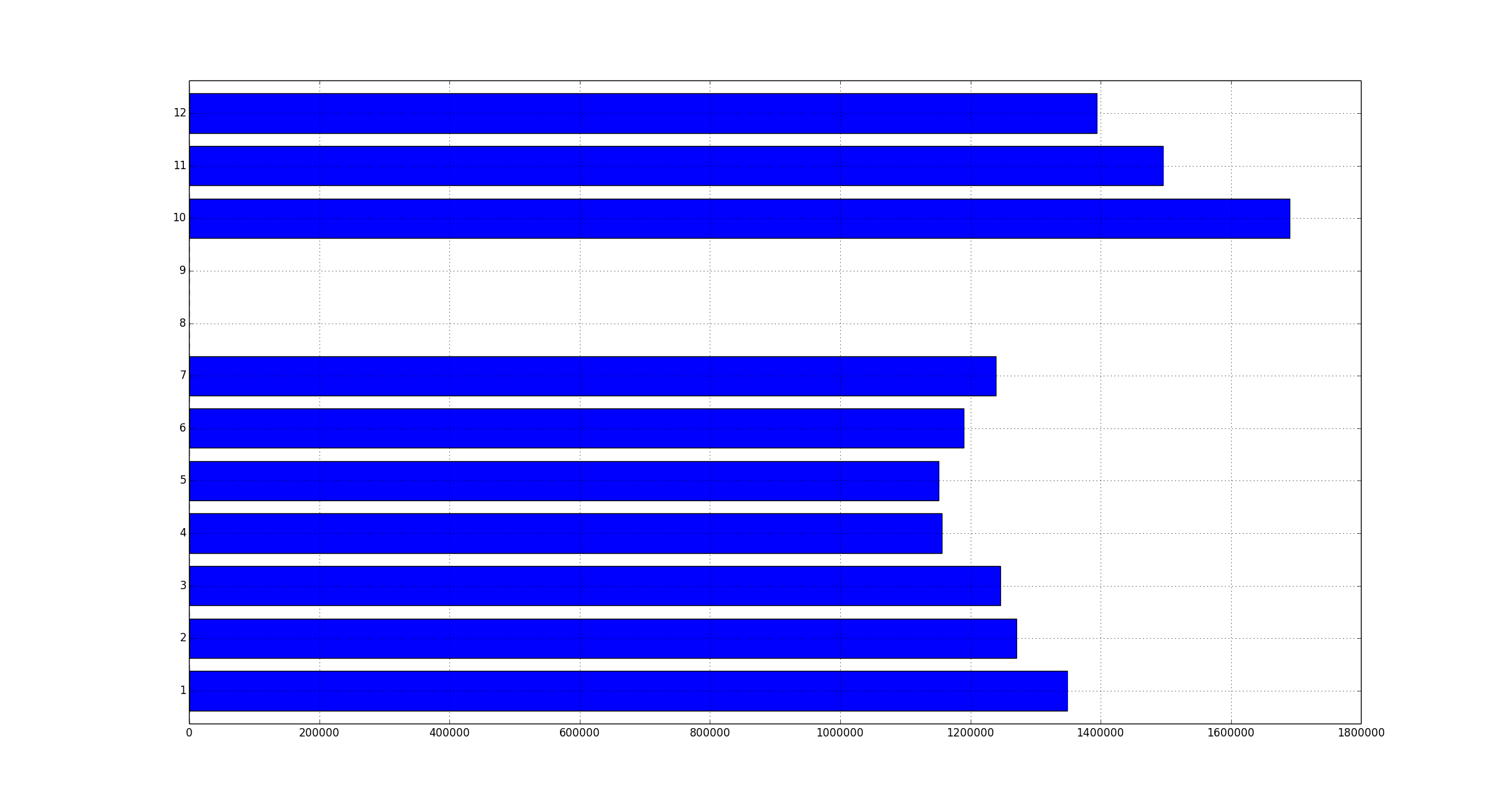
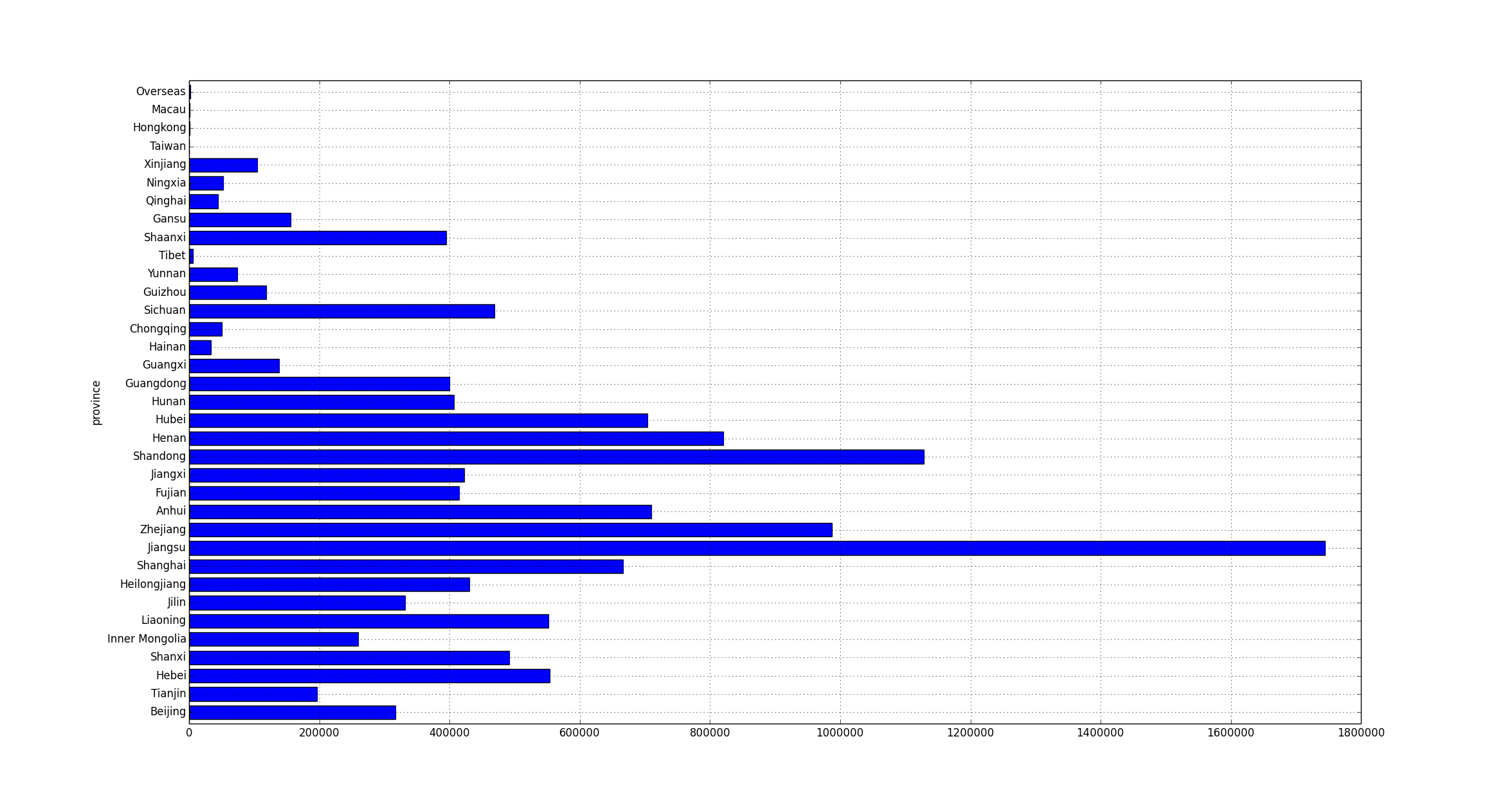
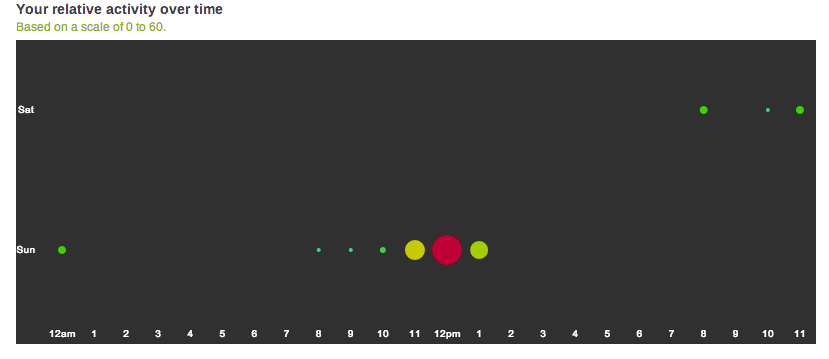
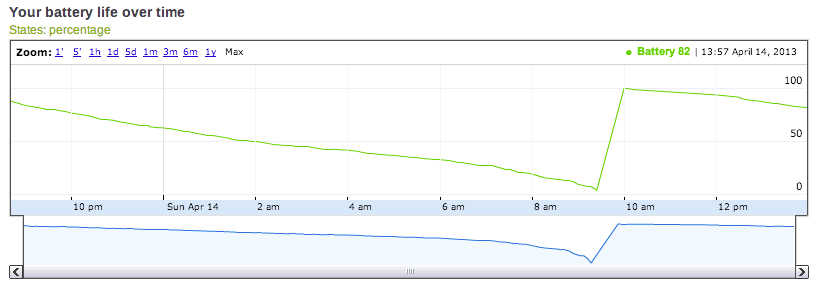
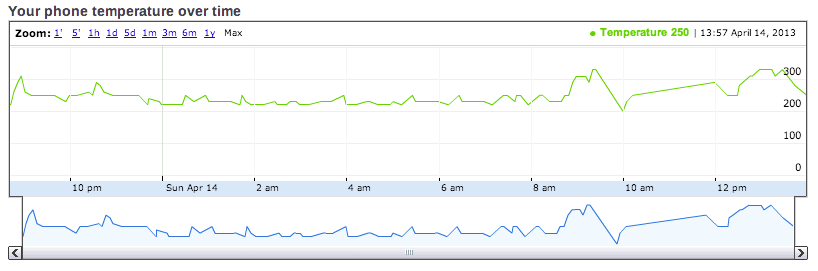
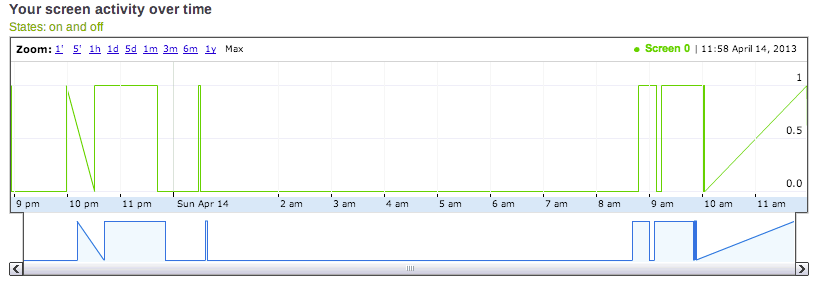
读完几本大数据的书,偶然发现了一个叫funf的手机应用,号称能将安卓手机变身为数据收集器。于是我很兴奋的下载安装,让这个app在我手机上采集了两天的数据,分析得到的结果如下:

battery_life phone_temperature relative_activity screen_activity


老实说,收集了两天的数据,就能分析出这么点东西,着实让人失望。不过这个生成图像信息的程序是开源的,而且是用Python实现的,今后有空了也可以自己来分析一下收集到的数据。funf在我的手机上也经常不能响应,可以说这个app是十足的半成品。不过这个由来自MIT的团队开发的不仅仅是一个手机app,号称是一个Open Sensing Framework,前几天还刚刚被Google收购了。虽然是个半成品,但Google这个时候收购团队总比让他们羽翼丰满之后再收购所花的代价要小得多。

Leave a Comment

Installing mod_xsendfile on OS X Lion

First download mod_xsendfile.c from https://tn123.org/mod_xsendfile/

Then compile and install it:

sudo apxs -cia mod_xsendfile.c

Add the following line to /etc/apache2/httpd.conf at the end of the first block of “Load” statements:

LoadModule xsendfile_module libexec/apache2/mod_xsendfile.so

At last, restart the apache server

sudo apachectl restart

Hi, the company I’m working for (yabroad.com) is hiring Website Backend and Frontend Developers to our platform team. We are building an open platform for youngsters to travel beyond boarders and we offer youngsters internship, language study, travel and volunteer opportunities. Please contact me if you are interested.

Leave a Comment

XBMC and OS X firewall permission popups

I installed XBMC on my Mac OS X Lion and every time I open up the program, a firewall permission dialog pops up. It didn’t help even if I added the XBMC in my firewall configurations. Popups still show up. This link solves the problem neatly — You can generate a certificate and sign the program by yourself. After that the frustrating dialog should appear only once (at most). In case the link becomes invalid, here’s a screenshot of the instructions. Click to see the large picture.

Leave a Comment